

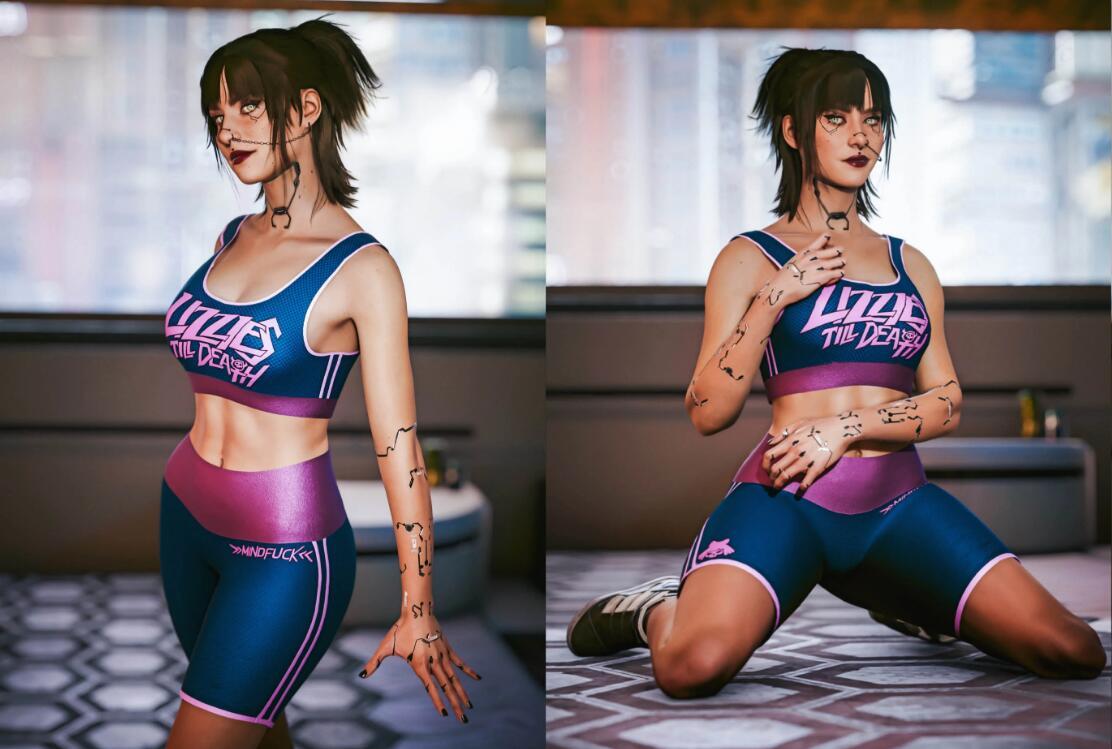
这是一款由玩家“Tottes”制作的mod,一件紫色和蓝色相间的运动背心。背心采用这两种色彩的交织设计,不仅呈现出强烈的视觉冲击力,还巧妙地融入了活力与时尚的元素。背心的正面,印有“LIVE THE JOURNEY”的字样,这句话仿佛是对穿着者的一种鼓励,提醒她要享受生活的旅程,追求内心的热爱与梦想。
运动装第2卷MOD安装
VortexMOD管理器安装:
1.解压缩。
2.安装,在左侧边栏点击模组,将下载好的MOD压缩文件直接拖入其中(游侠的部分MOD是非压缩包状态,需要玩家重新压缩)。
3.单击模组列表中的mod勾选启动它们,再次点击即可关闭。
4.开始游戏。(具体安装方法预览图可在MOD管理器下载页面查看,点此:)
FluffyModManager管理器安装:
1.解压缩。
2.安装,将MOD压缩包复制到[modmanager]/Games/Cyberpunk/Mods文件夹下,或者直接将压缩包格式的mod拖入窗口,就可以在MOD list中看到安装后的MOD。(不支持中文格式名称,不支持非压缩包的状态。)
3.单击模组列表中的mod勾选启动它们,再次点击即可关闭。
4.开始游戏。
手动安装:
1.解压缩。
2.将解压后得到的所有文件夹复制覆盖到Cyberpunk2077文件夹下,GOG版和EPIC版本的根目录文件名相同,完整的文件路径应当为Cyberpunk2077/archive/pc/mod或Cyberpunk2077/Mods。
3.开始游戏。
运动装第2卷MOD注意事项
必须前置补丁:
>>>
>>>
>>>
>>>
>>>
>>>
>>>
支持身体补丁(多选一):
>>>
>>>
>>>
>>>
>>>
>>>
>>>
服装MOD安装使用
使用前请确认是否安装CyberEngineTweaks控制台,如果没有可以,该版本为汉化版,如果不起作用,请点击下方链接下载最新版
>>>
1.在游戏内按下“~”或自定义的按键启动CyberEngineTweaks控制台,点击Console。
2.在栏中粘贴提前复制好的服装代码,按下回车键←┘。
3.在V房间的衣柜或者是可以换衣服的地方,进入,找到服装,点击穿上。
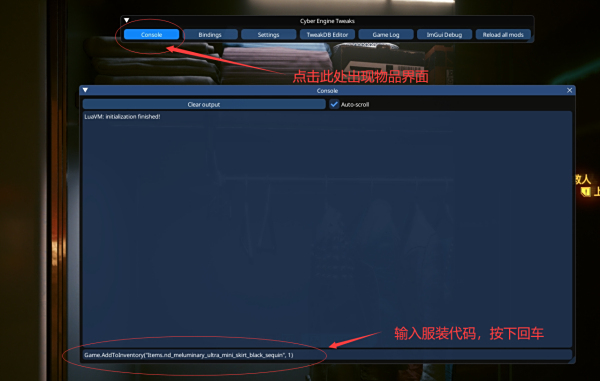
服装代码说明
---TOP---
Game.AddToInventory("Items.sp2_top_aldecaldos")
Game.AddToInventory("Items.sp2_top_animals")
Game.AddToInventory("Items.sp2_top_arasaka")
Game.AddToInventory("Items.sp2_top_maelstrom")
Game.AddToInventory("Items.sp2_top_militech")
Game.AddToInventory("Items.sp2_top_monkysp")
Game.AddToInventory("Items.sp2_top_mox1")
Game.AddToInventory("Items.sp2_top_mox2")
Game.AddToInventory("Items.sp2_top_mox3")
Game.AddToInventory("Items.sp2_top_ncpd")
Game.AddToInventory("Items.sp2_top_nicola")
Game.AddToInventory("Items.sp2_top_samurai")
Game.AddToInventory("Items.sp2_top_toxic")
Game.AddToInventory("Items.sp2_top_traumateam")
Game.AddToInventory("Items.sp2_top_valentinos")
Game.AddToInventory("Items.sp2_top_white")
Game.AddToInventory("Items.sp2_top_xcammo_blue")
Game.AddToInventory("Items.sp2_top_xcammo_green")
Game.AddToInventory("Items.sp2_top_xcammo_purple")
Game.AddToInventory("Items.sp2_top_xcammo_red")
---LOW---
Game.AddToInventory("Items.sp2_low_aldecaldos")
Game.AddToInventory("Items.sp2_low_animals")
Game.AddToInventory("Items.sp2_low_arasaka")
Game.AddToInventory("Items.sp2_low_maelstrom")
Game.AddToInventory("Items.sp2_low_militech")
Game.AddToInventory("Items.sp2_low_monkysp")
Game.AddToInventory("Items.sp2_low_mox1")
Game.AddToInventory("Items.sp2_low_mox2")
Game.AddToInventory("Items.sp2_low_mox3")
Game.AddToInventory("Items.sp2_low_ncpd")
Game.AddToInventory("Items.sp2_low_nicola")
Game.AddToInventory("Items.sp2_low_samurai")
Game.AddToInventory("Items.sp2_low_toxic")
Game.AddToInventory("Items.sp2_low_traumateam")
Game.AddToInventory("Items.sp2_low_valentinos")
Game.AddToInventory("Items.sp2_low_white")
Game.AddToInventory("Items.sp2_low_xcammo_blue")
Game.AddToInventory("Items.sp2_low_xcammo_green")
Game.AddToInventory("Items.sp2_low_xcammo_purple")
Game.AddToInventory("Items.sp2_low_xcammo_red")
 查看全文
查看全文